Notes:
- Make sure your TV and other audio devices have the latest software update installed. You can download and install the latest software update for your TV model or Sony audio devices from the Sony Support website. Refer to the How to perform a software update article for more information.
- Depending on your country or region, the models listed below may not be available. Not all models are sold in all countries or regions.
Supported models for each feature are as follows:
Acoustic Center Sync
BRAVIA TV

- 2026 models: BRAVIA 9 II (XR90M2), BRAVIA 7 II (XR70M2)
- 2025 models: BRAVIA 8 II (XR80), BRAVIA 5 (XR50)
- 2024 models: BRAVIA 9 (XR90), BRAVIA 8 (XR80), and BRAVIA 7 (XR70)
- 2023 models:A95L, X95L, A80L, X90L, X93L, and A75L series
- 2022 models: Z9K, A95K, X95K, A90K, A80K, A75K, and X90K series
- 2021 models: Z9J, A90J, A80J, and X95J series
Soundbar or Home Theater System

- BRAVIA Theatre Quad (HT-A9M2)
- BRAVIA Theatre Bar 9 (HT-A9000)
- BRAVIA Theatre Bar 8 (HT-A8000)
- HT-A9
- HT-A7000
- HT-A5000
- HT-A3000
AV Receiver

- STR-AN1000
- STR-AZ1000ES
- STR-AZ3000ES
- STR-AZ5000E
- STR-AZ7000ES
- TA-AN1000
Voice Zoom 3™ works with Sony Soundbar/Home Theater System
BRAVIA TV
- 2026 models: BRAVIA 9 II (XR90M2), BRAVIA 7 II (XR70M2)
- 2025 models: BRAVIA 8 II (XR80), BRAVIA 5 (XR50)
- 2024 models: BRAVIA 9 (XR90), BRAVIA 8 (XR80), and BRAVIA 7 (XR70)
- 2023 model: A95L series
Soundbar or Home Theater System
- BRAVIA Theatre Trio (HT-A8)
- BRAVIA Theatre Quad (HT-A9M2)
- BRAVIA Theatre Bar 9 (HT-A9000)
- BRAVIA Theatre Bar 8 (HT-A8000)
- BRAVIA Theatre Bar 7 (HT-A7100)
- BRAVIA Theatre Bar 6 (HT-B600/BD60)
- BRAVIA Theatre Bar 5 (HT-B500/HT-BC50/HT-BD50)
- BRAVIA Theatre System 6 (HT-S60)
Direct Connect to BRAVIA Theatre Sub/Rear
- If the user interface (UI) does not appear in BRAVIA Quick Settings after you update the TV and audio device to the latest software, keep the TV connected to the network for a while. The UI may appear after some time.
- When this function is enabled, and the content type is set to "Game" or "PC", the sound may be delayed compared to the picture, causing noticeable lip-sync issues. To minimize this issue, change the content type to something other than "Game" or "PC.
- The Voice Zoom function is unavailable while this function is in use.
- Wired headphones and Bluetooth devices cannot be used while this function is enabled.
BRAVIA TV
- 2026 models: BRAVIA 9 II (XR90M2), BRAVIA 7 II (XR70M2)
- 2025 models: BRAVIA 8 II (XR80M2), BRAVIA 5 (XR50)
- 2024 models: BRAVIA 9 (XR90), BRAVIA 8 (XR80), BRAVIA 7 (XR70)
- 2023 models: A95L Series
Optional Speakers

- BRAVIA Theatre Sub 9 (SA-SW9)
- BRAVIA Theatre Sub 8 (SA-SW8)
- BRAVIA Theatre Rear 9 (SA-RS9)
- BRAVIA Theatre Sub 7 (SA-SW7)
- BRAVIA Theatre Rear 8 (SA-RS8)
My Cinema
- If the user interface (UI) does not appear in BRAVIA Quick Settings after you update the TV and audio device to the latest software, keep the TV connected to the network for a while. The UI may appear after some time.
BRAVIA TV
- 2026 models: BRAVIA 9 II (XR90M2), BRAVIA 7 II (XR70M2)
- 2025 models: BRAVIA 8 II (XR80M2), BRAVIA 5 (XR50)
- 2024 models: BRAVIA 9 (XR90), BRAVIA 8 (XR80), BRAVIA 7 (XR70)
- 2023 models: A95L Series
Soundbar or Home Theater System
- BRAVIA Theatre Trio (HT-A8)
- BRAVIA Theatre Bar 7 (HT-A7100)
- BRAVIA Theatre Bar 5 (HT-B500/HT-BC50/HT-BD50)
- BRAVIA Theatre Bar 6 (HT-B600/BD60)
- BRAVIA Theatre System 6 (HT-S60)
- BRAVIA Theatre Quad (HT-A9M2)
- BRAVIA Theatre Bar 9 (HT-A9000)
- BRAVIA Theatre Bar 8 (HT-A8000)
- HT-A9
- HT-A7000
- HT-A5000
- HT-A3000
- HT-S400
- HT-SD40
- HT-SC40
- HT-S2000
Effortless control with BRAVIA TV
Note: If the Quick Settings screen does not appear even after updating your TV and audio device to the latest software, keep the TV connected to the network for a while.
BRAVIA TV
- 2026 models: BRAVIA 9 II (XR90M2), BRAVIA 7 II (XR70M2), BRAVIA 3 II (XR30M2)
- 2025 models: BRAVIA 8 II (XR80), BRAVIA 5 (XR50), BRAVIA 3 (S30), BRAVIA 2 II (S20)
- 2024 models: BRAVIA 9 (XR90), BRAVIA 8 (XR80), BRAVIA 7 (XR70), and BRAVIA 3 (S30)
- 2023 models: A95L, X95L, A80L, X90L, X85L, X82L, X80L, X93L, A75L and X75WL series
- 2022 models: Z9K, A95K, X95K, A90K, A80K, A75K, X90K, X85K, and X80K series
- 2021 models: Z9J, A90J, A80J, X95J, X91J (85), X90J, X85J, and X80J series
- 2020 models: XH90_X90H_X91H_XH92, XH80_X80H_X81H, XH81, A8x_A8H, A9_A9S, Z8H_ZH8, XH95_X95H (55, 65, 75), Z9H, XH95_X95H (49, 85), and XH85_X85H_XH91 series
- 2019 models: XG95_X95G, XG85_X85G_U8G (55, 65, 75, 85), X85G (KJ-43, 49), Z9G_ZG9, and A9G_AG9 series
Soundbar or Home Theater System
- BRAVIA Theatre Trio (HT-A8)
- BRAVIA Theatre Quad (HT-A9M2)
- BRAVIA Theatre Bar 9 (HT-A9000)
- BRAVIA Theatre Bar 8 (HT-A8000)
- BRAVIA Theatre Bar 7 (HT-A7100)
- BRAVIA Theatre Bar 6 (HT-B600/BD60)
- BRAVIA Theatre Bar 5 (HT-B500/HT-BC50/HT-BD50)
- BRAVIA Theatre System 6 (HT-S60)
- HT-A9
- HT-A7000
- HT-A5000
- HT-A3000
- HT-S400
- HT-SD40
- HT-SC40
- HT-S2000
Note: All 2019 and 2020 TV models (except the XH90_X90H_X91H_XH92 series) only support the HT-A9, HT-A7000, and HT-A5000.
AV Receiver
- STR-AN1000
- STR-AZ1000ES
- STR-AZ3000ES
- STR-AZ5000ES
- STR-AZ7000ES
- TA-AN1000
Note: AV Receivers are not supported by 2019 and 2020 TV models (except for the XH90_X90H_X91H_XH92 TV series).
360 Spatial Sound Personalizer
BRAVIA TV
BRAVIA TV (WLA-NS7 not required)
Note: When using these TVs with compatible headphones, neither the transmitter supplied for the Wireless Neckband Speaker (SRS-NS7) nor the wireless transmitter (WLA-NS7) is required.
- 2026 models: BRAVIA 9 II (XR90M2), BRAVIA 7 II (XR70M2)
- 2025 models: BRAVIA 8 II (XR80), BRAVIA 5 (XR50)
- 2024 models: BRAVIA 9 (XR90), BRAVIA 8 (XR80), and BRAVIA 7 (XR70)
- 2023 models: A95L series
BRAVIA TV (WLA-NS7 required)
- 2023 models: X95L, A80L, X90L, X93L, and A75L series
- 2022 models: Z9K, A95K, X95K, A90K, A80K, A75K, and X90K series
- 2021 models: Z9J, A90J, A80J, X95J, and X90J series
Neckband Speaker

- SRS-NS7
- BRAVIA Theatre U (HT-AN7)
Headphones
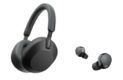
- Refer to the What devices can I use to enjoy TV audio in 360 spatial sound? article.
Please accept Youtube cookies to watch this video
Access your cookie preferences below and make sure to switch on the Youtube cookie under the 'Functional' section.
Related Articles
Register your product
Get access to all information, keep your product up to date and enjoy great deals
Sony Community
Visit our Community and share your experiences and solutions with other Sony customers
Contact support
Contact your Sony Support team
Repair & Warranty
Book, track or maybe even avoid a repair