IMPORTANT: This article applies only to specific products and/or operating systems. Check Applicable Products and Categories for details.
If you hear a high-pitched howling sound when using your LinkBuds Fit, it’s not because you’re wearing them during the full moon and are being chased by a werewolf.
Instead, due to the enhanced noise-canceling and external sound-capturing capabilities, touching the microphone or covering or pinching the earbuds may generate noise feedback.
3 tips to avoid high-pitched feedback on the Linkbuds Fit
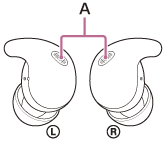
- When touching your LinkBuds Fit, touch them lightly and try to avoid the microphones (marked as A on the picture below).
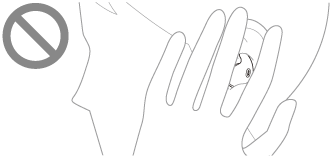
- Don’t cover your earbuds with your hands or other objects.
- Lower the ambient sound volume in [Ambient Sound Control] on the Sony | Sound Connect app to reduce the outside sound level.