Blur the background
Large aperture
© Morten Rygaard
Understanding aperture unlocks your creative potential, allowing you to shape the mood and story of every photo you take.
Aperture controls how much light enters your camera and affects the depth of field. A wide aperture (low f-number) creates a blurry background, making your subject stand out. A narrow aperture (high f-number) keeps more of the scene in focus, which is great for landscapes.

Using Aperture Priority mode on your Sony Alpha camera is a great way to take control of your photos while keeping things simple. You choose the aperture to get the background blur or keep everything in focus and the camera automatically sets the right shutter speed for a well-exposed image. This lets you focus on your creativity and composition without worrying about all the technical details.
Why use this mode?
© Morten Rygaard

© Albert Dros

© Mads Peter Iversen
What is an Aperture?
A lens aperture is the opening in a camera lens that lets light in. A bigger opening means more light and a brighter photo, while a smaller opening lets in less light. It also affects how much of the picture is in focus.
Aperture blades
These are blades inside the lens that control the size of the opening and how much light is let through.
Apertures are represented by ƒ-Numbers. The larger the number, the smaller the opening.


What is the effect of Aperture?


How to set Aperture on your Alpha
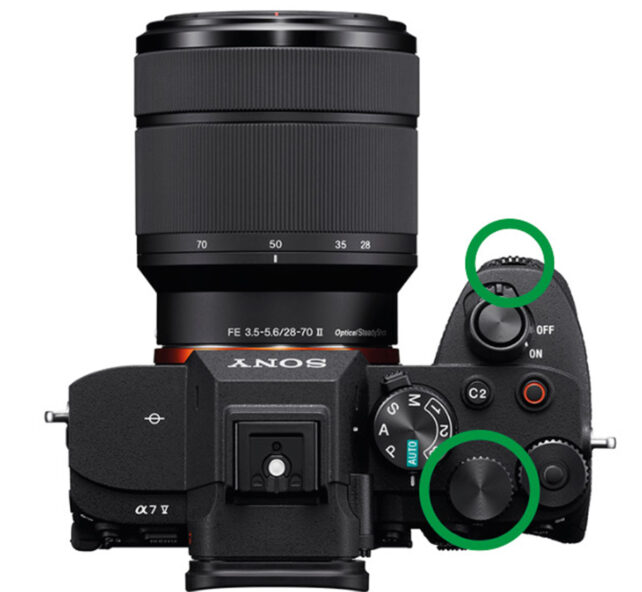
Set your camera's mode dial to the A setting (Aperture Priority)
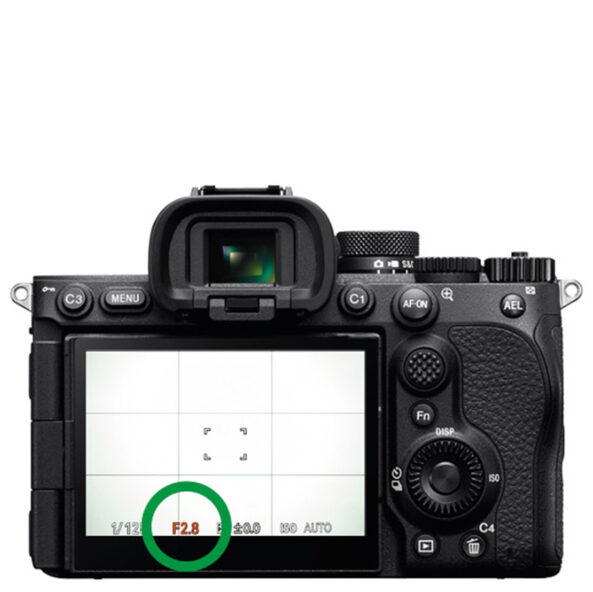
Use the dials on the front of the grip, the top of the camera or the back of the camera to change the Aperture (The ƒ-number).